

Card Readers
A delivery driver at the door, a technician closing a work order in the driveway, a vendor at a weekend market, and a clerk taking a card at a desk all need to accept a payment without a full terminal in front of them. Credit card readers do that: a pocket reader pairs with the phone or tablet the person already carries, and a desktop reader plugs into the workstation, and both take chip and contactless at card-present rates.
Paygasus carries card readers that run on the same account and dashboard as the counter registers, sold outright with the software plan as an optional add-on, with docks and stands in Accessories. The guide below the catalog covers where a reader beats a terminal and how the pairing works.
-
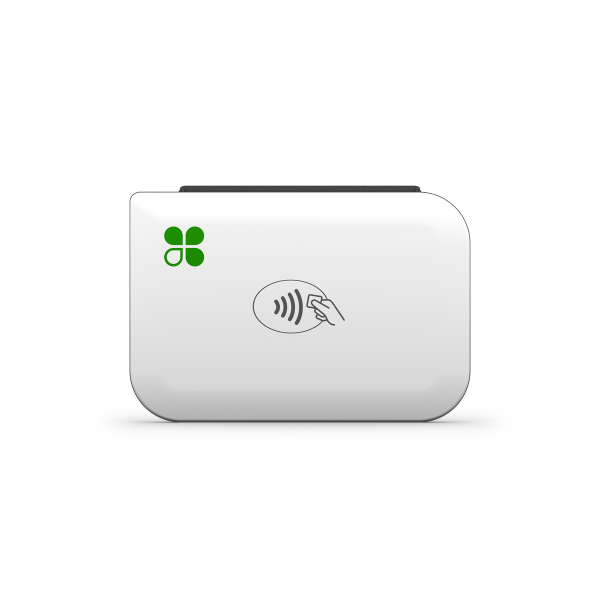
Clover Go 3rd Gen C600 Card Reader - Chip, Contactless, Swipe, Bluetooth (1IK4ZZZ0001)
Pocket card reader that pairs over Bluetooth with an iOS or Android phone or tablet to take chip, contactless, and swipe payments through the...
More details$122.40
No products match these filters.
Where a Card Reader Beats a Full Terminal
A reader is the right device when the person taking the payment already holds a phone or sits at a computer, and the wrong one when the position needs a printer, a customer screen, or a device that runs all day on its own. The table sorts the common cases.
| Where It Is Used | Why a Reader Fits | When a Terminal Fits Better |
|---|---|---|
| Delivery and route sales | Driver takes the card at the door on the phone already in hand; no second device to charge or carry | A handheld terminal with a printer when the customer needs a paper receipt |
| Field service and installations | Technician closes the ticket and takes payment in the driveway, synced to the office dashboard | A terminal when the crew runs several jobs a day from one vehicle |
| Events, markets, and pop-ups | Reader and a phone in a pocket; a dock on the table when there is one | A terminal when the line is long and the phone cannot keep up |
| Front desk and back office | Desktop reader on the workstation for card-present rates on phone-in and walk-up payments | A countertop terminal when the desk takes payments all day |
| Second register at peak | A spare phone and a reader open a second line at the counter in a minute | A fixed register when the second line runs every day |
Bluetooth, USB, and Phone-Paired Readers
Card readers come in two forms. A mobile reader pairs over Bluetooth with an iOS or Android phone or tablet and runs through the payments app on that device. A desktop reader connects over USB to a workstation and takes the card for a payment entered on screen. The Clover Go is the current mobile reader:
- ✔ Chip, contactless, and swipe, so every card type clears at card-present rates instead of keyed rates
- ✔ Bluetooth pairing with iOS and Android, so the reader works with the phone or tablet the staff member already carries
- ✔ Tap to Pay on iPhone inside the app, so contactless runs even when the reader is in the other pocket
- ✔ One-touch tipping, refunds, returns, and open orders in the app, so field sales close the same way as the counter
- ✔ A rechargeable battery with USB-C charging, and a charging dock with a Kensington slot for a reader that lives on a counter
Docks and stands are in Accessories.
What Arrives Ready to Pair
The shipment carries the reader, its charging cable, and a quick start guide. The reader activates on a merchant account that a Paygasus rep opens with the order or attaches to the one you hold; the staff member installs the app, signs in, and pairs the reader over Bluetooth. Every sale syncs to the same dashboard as the counter registers. Shipping, returns, and warranty follow the shop's standard terms of sale.
Common Questions
Does a Card Reader Need Its Own Software Plan?
A mobile reader runs on the account's plan. On a Clover account, the Clover Go is covered by the Essentials plan at no added device fee, and it runs on Starter and Clover for Healthcare as well; it cannot be the only device on a Growth plan. The software plans page lists what each tier includes.
Which Phones and Tablets Does a Reader Pair With?
Mobile readers pair with iOS and Android phones and tablets over Bluetooth through the payments app; the app and the reader do the pairing, not the phone's Bluetooth settings. Desktop readers connect over USB to the workstation that runs the payment screen.
Can a Reader Take Contactless Without Tapping the Phone?
Yes. The reader has its own contactless antenna, so the customer taps the reader. On an iPhone, Tap to Pay in the app also takes contactless on the phone itself, so a staff member can take a tap with the reader still in the bag.
What Happens When the Phone Has No Signal?
A mobile reader uses the phone's connection, Wi-Fi or cellular, to authorize the card. With no signal there is no authorization, so a route that runs through dead zones wants a phone on a carrier with coverage there or a hotspot in the vehicle. A handheld terminal with its own LTE radio is the answer where that is not enough.
Outfitting a fleet of drivers or technicians? Contact a Paygasus specialist for a quote.