

Kiosks
The counter backs up at noon, the cafeteria runs on one cashier, and the concession stand loses the first ten minutes of halftime to the line. Self-service kiosks take the order, the modifiers, and the payment on one screen, so the people behind the counter work the pass and the pickup shelf instead of the register.
Paygasus carries self-ordering kiosks that run on the same account and menu as the counter registers and the kitchen screens, sold outright with the software plan as an optional add-on, with the floor stands and wall mounts in Accessories. The guide below the catalog covers where a kiosk replaces a staffed line and how to mount it.
-
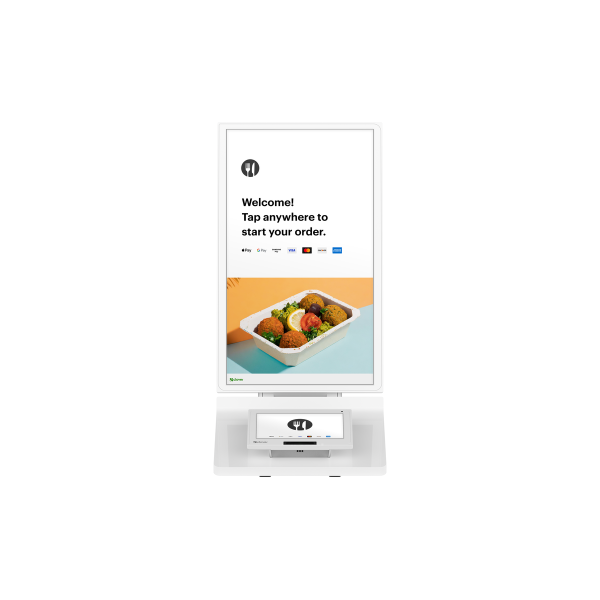
Clover Kiosk Self-Ordering POS - 24 Inch Touchscreen, C800 Payment Module, Printer, Wi-Fi, Ethernet, LTE
Self-ordering kiosk with a 24 inch order touchscreen, 8 inch payment touchscreen, built-in receipt printer, and Wi-Fi, Ethernet, or LTE for...
More details$2,418.99
No products match these filters.
Where a Self-Service Kiosk Replaces a Staffed Line
A kiosk takes the order and the payment. It does not take the whole counter. The table shows which part of each line moves to the screen and which part stays with a person.
| The Line | What the Kiosk Takes Over | What Stays With Staff |
|---|---|---|
| Quick service counter | Menu browsing, modifiers, combo building, card and contactless payment, order number on the receipt | Cash orders, voids, and anything the manager has to approve |
| Cafeteria and campus dining | Walk-up orders at the peak, declining-balance and card payment, orders routed to the line | Meal plan exceptions, catering orders, cash |
| Concession stand | Halftime and intermission volume on two or three screens instead of one register | Age-restricted sales that need an ID check at a staffed register |
| Hotel and hospital grab-and-go | Orders around the clock when the counter is unstaffed, receipts by print | Room charges and account billing that stay with the desk |
| Municipal and transit service counter | Permit, pass, and fee payments with a receipt, off the staffed window | Applications that need documents reviewed by a clerk |
A kiosk order moves at the pace of the customer reading the menu, not the pace of the register, so a second or third screen adds capacity without adding a cashier.
Screen, Payment, Printer, and Mounting on a Kiosk
A self-ordering kiosk is two screens and a printer in one housing. The Clover Kiosk is the current model:
- ✔ A 24 inch order touchscreen for the menu, modifiers, and upsell prompts, large enough to read from a step back
- ✔ An 8 inch payment screen below it that takes contactless, chip, swipe, and PIN debit, including Apple Pay, Google Pay, and Samsung Pay
- ✔ A built-in thermal printer for the receipt or the order number
- ✔ Wi-Fi, Ethernet, and LTE, so the kiosk connects on the store network or on cellular where there is no drop
- ✔ Countertop placement out of the box, a 100 mm VESA wall mount for narrow lobbies, or a floor stand with height adjustment for wheelchair reach and a bolt-down base for busy entrances
Floor stands and wall mounts are in Accessories and ship with the kiosk when ordered together.
What Arrives Ready to Deploy
The shipment carries the kiosk with its payment module and power supply. The menu is built once in the same dashboard that runs the counter registers, so the kiosk shows the items and modifiers the cashiers already sell. The kiosk activates on a merchant account that a Paygasus rep opens with the order or attaches to the one you hold, and it runs on the account's software plan. Clover Care, a three-year device protection plan, is offered as an option. Shipping, returns, and warranty follow the shop's standard terms of sale.
Common Questions
Does a Kiosk Need Its Own Software Plan?
A kiosk runs on the account's plan as an added device with its own monthly device fee, not on a separate plan. The Clover Kiosk runs on the Restaurant Growth plan, so an account that adds a kiosk sits on that tier. The software plans page lists what each tier includes.
Can Customers Pay With Contactless and PIN Debit at the Kiosk?
Yes. The payment screen takes contactless from cards and phone wallets, chip, swipe, and PIN debit, so the kiosk handles the same card types as the counter register.
Floor Stand, Wall Mount, or Countertop?
Countertop when the kiosk sits on an existing counter or ledge. Wall mount when the lobby is narrow and floor space is the constraint. Floor stand when the lobby is open and the kiosk needs to stand on its own, with the height setting that puts the screen in reach from a wheelchair and the bolt-down base for entrances with heavy traffic.
Can One Kiosk Run With the Counter and Kitchen Screens?
Yes. The kiosk, the counter registers, and the kitchen display run on one account, so kiosk orders route to the kitchen in the same queue as counter orders and report together in the dashboard.
Planning more than one kiosk, or a rollout across sites? Contact a Paygasus specialist for a quote.