
Peplink Router Use Cases: Which Model Fits Each Site Type
Balance or MAX, one modem or two, a hub or not. How the lineup sorts by the site it goes to, with the payment terminal in the picture, and which care plan each model needs.
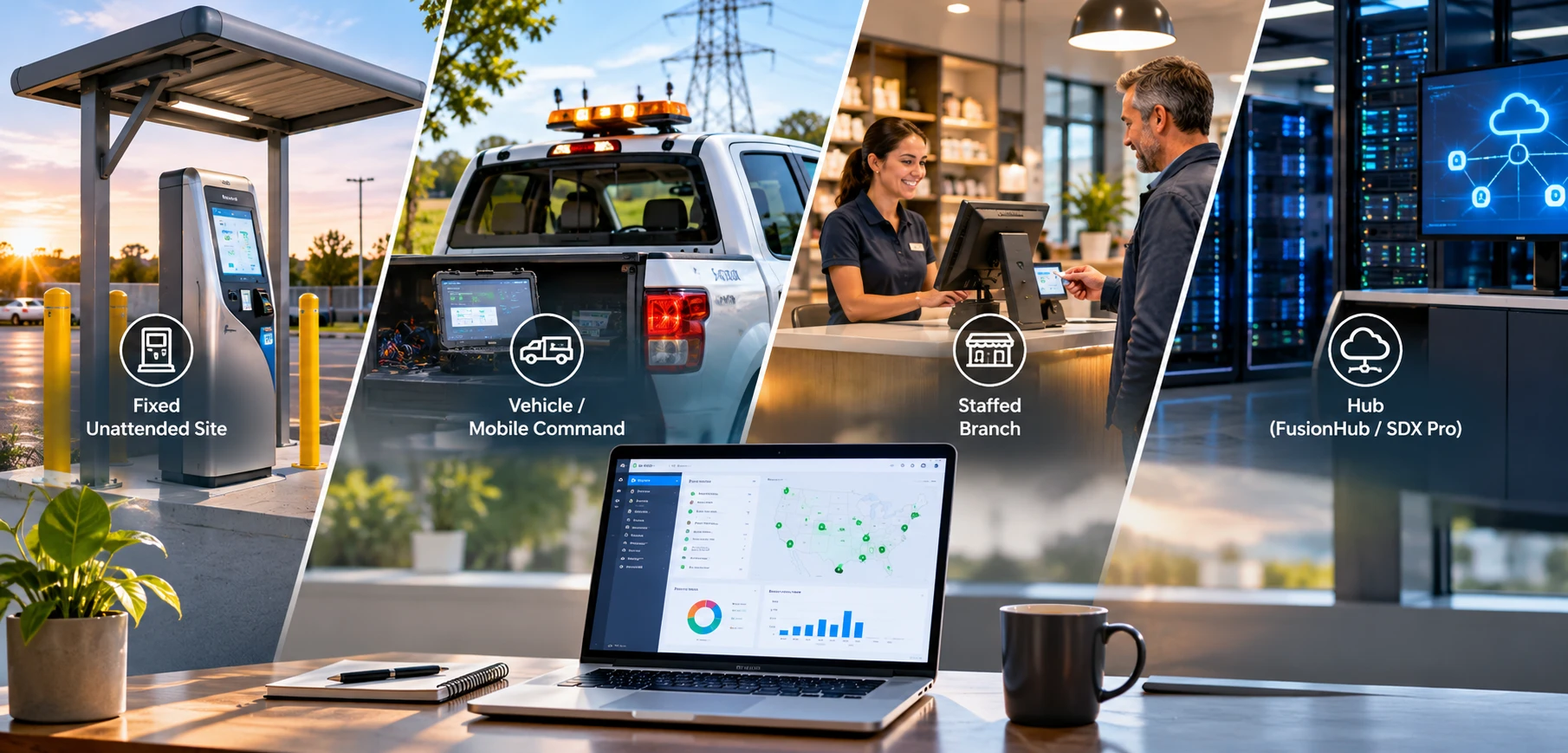
This guide covers nine routers from Peplink's Balance and MAX lines, along with the FusionHub virtual appliance, and the site, more than any feature, determines which model a buyer needs. For enterprise, municipal, and utility buyers, the Peplink router use cases that matter fall into four site types: the fixed unattended site, the vehicle, the staffed branch, and the hub. The sections that follow identify the models suited to each site type, explain what each model requires in licensing, and note when a hub must sit at the other end of the connection.
The site determines the router. A fixed unattended site, a vehicle, a staffed branch, and a hub each eliminate most of the lineup at the first question. The payment terminal behind the router determines the rest: its own VLAN, DC power at the stand, and, where a missed authorization matters, a second live path that the tunnel can bond, which keeps the authorization from waiting on a reconnect.
Four Questions That Sort Every Peplink Model
Four questions determine the model: where the router will be installed, how many carriers it must hold at once, how many sites one console will manage, and whether a device terminates the tunnel at the other end.
Balance or MAX: Fixed Site or Vehicle
Balance is the office and rack-mount line. The Balance 20X and B One 5G top out at 45°C and the SDX Pro at 40°C, while the current Balance 310 5G is rated -40 to 65°C; the larger units run on AC power. MAX is the enclosure and vehicle line, rated for -40 to 65°C on 10 to 30 V DC, with ignition sensing on the vehicle models; the Transit Duo Pro and HD4 MBX 5G accept 12 to 56 V. The B One 5G is rated down to -40°C but tops out at 45°C, which confines it to indoor installations. Fixed and indoor models are the B One 5G, Balance 20X, Balance 310 5G, and Balance SDX Pro. Rugged and vehicle models are the MAX BR1 Mini, BR1 Mini 5G, BR1 Pro 5G, Transit Duo Pro, and HD4 MBX 5G.
One Modem or Two
A single modem with two SIM slots attaches to one carrier at a time. The second SIM is a spare rather than a second path. A failed WAN health check can trigger a switch to the other SIM slot, but the switch is slow and, on a single-modem router, not dependable; it is not a substitute for a second modem. Two modems hold two carriers simultaneously, and only a two-modem router can bond them. The single-modem models are the BR1 Mini, BR1 Mini 5G, BR1 Pro 5G, B One 5G, Balance 20X, and the current Balance 310 5G. The models with two or more modems are the Transit Duo Pro, HD4 MBX 5G, and SDX Pro.
How Many Sites Behind One Console
InControl 2, Peplink's cloud console, pushes a single group configuration to hundreds of routers, runs bulk firmware updates, and opens any router's web admin remotely. The hub, not the branch router, sets the ceiling: a Balance 310 5G terminates 30 SpeedFusion peers with PrimeCare, an SDX Pro terminates 800, and a FusionHub virtual appliance scales with its license.
Whether a Hub Sits at the Other End
SpeedFusion is Peplink's name for the tunnel that carries hot failover, bandwidth bonding, and WAN smoothing. The tunnel requires a Peplink endpoint at each end: another Peplink router, a FusionHub virtual appliance, or Peplink's hosted SpeedFusion Connect Protect service. A single site with no hub is limited to WAN failover between its own links, with none of the three tunnel features, regardless of the router installed. Tunnel throughput figures in this guide are the datasheet values with 256-bit AES encryption, which is how payment traffic runs; the unencrypted figures are higher.
Fixed Unattended Site: Chargers, Kiosks, Car Washes, Lots
A fixed unattended site typically has one terminal, sometimes a camera, and a router inside an enclosure. The router must carry the authorization on whichever path is available, run on the DC power at the stand, and recover without a site visit. The deciding question is whether the site can tolerate a missed authorization during a carrier problem. A single-modem router with no fixed line has one active path, and a carrier problem that leaves the SIM attached but passing no data will decline cards until the router recovers.
| Model | Modems | Power and Temperature | SpeedFusion | Fit |
|---|---|---|---|---|
| MAX BR1 Mini | One LTE, two SIM slots, eSIM. | 10 to 30 V DC or PoE-in; -40 to 65°C. | Not active out of the box. Enabled by PrimeCare or the perpetual feature pack; 60 Mbps through the encrypted tunnel. | The entry-level choice for a low-volume site on cellular alone, with one active path. |
| MAX BR1 Mini 5G | One 5G, two SIM slots, eSIM. | 10 to 30 V DC or PoE-in; -40 to 65°C. | Same as the BR1 Mini: PrimeCare or the feature pack; 60 Mbps. | The same site where a survey confirms 5G coverage. |
| MAX BR1 Pro 5G | One 5G, redundant SIM, eSIM. | 10 to 30 V DC; -40 to 65°C. | Included with PrimeCare, first year complimentary; 200 Mbps through the encrypted tunnel. | A site with a fixed line plus cellular, or more than a terminal behind the router. |
MAX BR1 Mini and BR1 Mini 5G
The BR1 Mini is the entry-level option for a single terminal on cellular alone, and its PoE-in port lets one cable carry both power and data. Its limitation is structural: with one modem and no fixed line, the site has a single active path, and a carrier problem that leaves the SIM attached but passing no data will decline cards until the router recovers. The Mini fits a low-volume site where that risk is acceptable. Two features ship inactive: the Ethernet WAN port and the SpeedFusion features. Either PrimeCare or the one-time feature pack turns both on, so a Mini at a kiosk that also has a fixed line needs one of the two before the line is connected. The Mini 5G uses the same chassis with a 5G modem, for sites where a survey confirms 5G coverage.
MAX BR1 Pro 5G When the Terminal Needs Headroom
The BR1 Pro 5G is the choice for a site with a fixed line as primary and cellular as backup, a technician's tablet on Wi-Fi 6, or a camera and signage behind the same router as the terminal. Because the fixed line and the cellular modem are both live, the tunnel can bond them and keep the cellular path warm, which makes this the router described in the cellular failover guide for sites where a missed authorization is not acceptable. Where no fixed line is available, a satellite terminal on the WAN port can provide the second path.
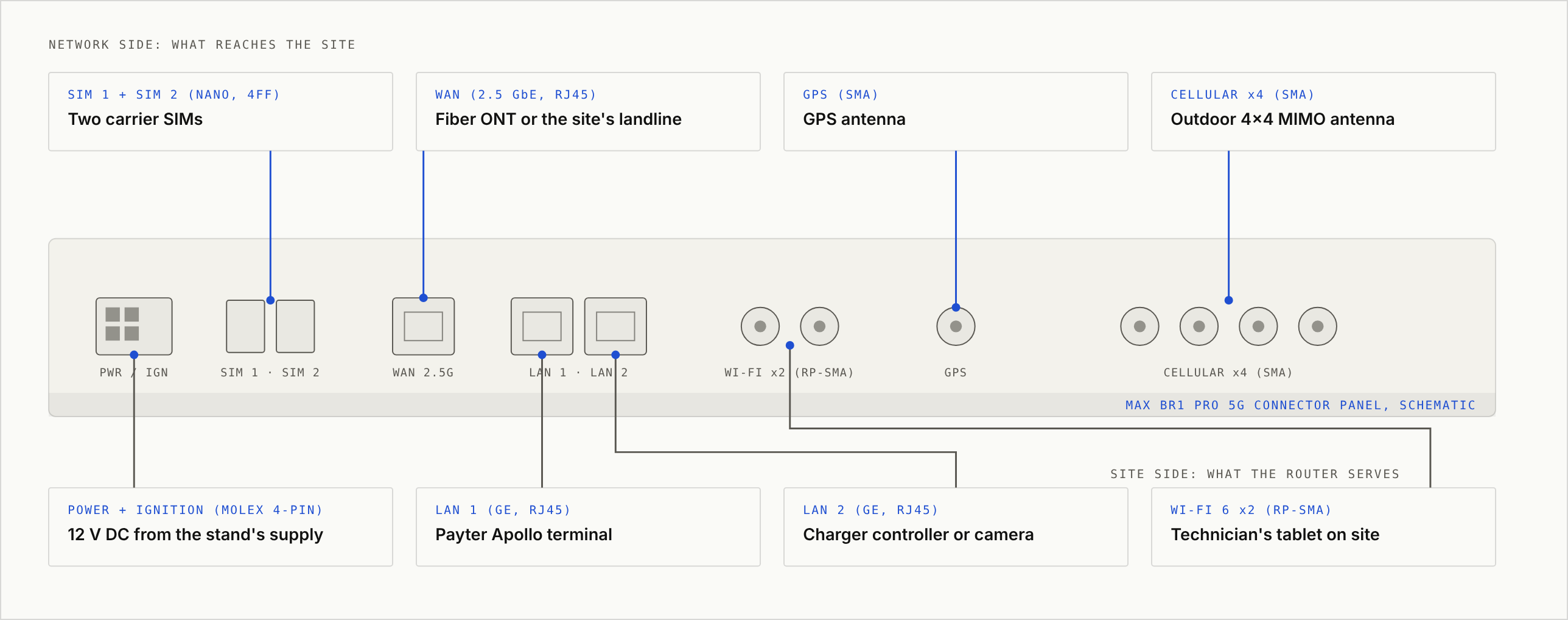
Each connector on the BR1 Pro 5G and the equipment it connects to at the site:
| Port | What It Meets at the Site |
|---|---|
| SIM 1 and SIM 2 (nano-SIM) | Two carrier SIMs, one active at a time, under carrier-agnostic SIM management. |
| WAN (2.5 GbE) | The fiber ONT or the site's fixed line, as primary. |
| GPS (SMA) | A GPS antenna that places the site on the InControl 2 map. |
| Cellular (four SMA) | An outdoor 4x4 MIMO antenna mounted outside the enclosure; the Peplink Mobility 40G and Slim 40G antennas in the Paygasus shop cover all four connectors plus GPS. |
| Power and ignition (Molex 4-pin) | 12 V DC from the stand's supply, on the same battery backup as the terminal. |
| LAN 1 (GE) | The Payter Apollo terminal on its own VLAN. |
| LAN 2 (GE, PoE-in on HW3) | The charger controller, kiosk PC, or camera on its own VLAN. |
| Wi-Fi 6 (two RP-SMA) | The field technician's tablet on a separate SSID and VLAN. |
Keeping the Terminal on Its Own VLAN
Peplink's kiosk configuration guide places the card terminal on its own VLAN, separate from any staff or guest Wi-Fi. The router provides the segmentation; its effect on the operator's PCI scope is for the acquirer to determine. None of the models covered here carries an IP rating, which makes the enclosure the integrator's responsibility, and remote reboots run through the remote web admin in InControl 2.
Vehicles and Mobile Command
A vehicle router must draw 12 or 24 V from the vehicle and power down with the engine. Three MAX models cover the patrol car, the utility truck, and the command vehicle.
| Model | Modems | DC Input and Ignition | SpeedFusion | Fit |
|---|---|---|---|---|
| MAX BR1 Pro 5G | One 5G, redundant SIM. | 10 to 30 V, ignition sensing, E-Mark and EN50155 rated. | Included with PrimeCare; 200 Mbps encrypted. Bonding requires a second WAN; Paygasus pairs it with Starlink. | The single-carrier patrol car or service truck that needs 5G. |
| MAX Transit Duo Pro | Two LTE, four SIM slots, eSIM. | 12 to 56 V, ignition sensing. | Hot failover and smoothing enabled by default from firmware 8.5.0; bonding with PrimeCare; 200 Mbps encrypted. | The vehicle that must hold two carriers at once. |
| MAX HD4 MBX 5G | Four 5G, redundant SIM per modem. | 12 to 56 V, ignition sensing. | Hot failover, bonding, and smoothing; EssentialCare model, with SpeedFusion licensed separately; 600 Mbps unencrypted. | The command vehicle carrying a crew's worth of devices. |
MAX BR1 Pro 5G for the Single-Modem Patrol Car
For a fleet on one carrier that needs 5G throughput in the cab, the BR1 Pro 5G is the default choice. Its E-Mark and EN50155 ratings cover vehicle and rail electrical environments, and Peplink pairs it with a low-profile antenna for patrol car installations that avoid drilling the roof. With one modem, the router holds a single carrier, and bonding becomes available only when a second WAN is added, which at Paygasus is a Starlink terminal.
MAX Transit Duo Pro When Two Carriers Must Bond
The Transit Duo Pro holds two carriers at once and bonds them into one tunnel; hot failover and smoothing are on by default from firmware 8.5.0, and bonding comes with PrimeCare. The trade-off is LTE in place of 5G. For a utility truck working at the edge of coverage, where one carrier drops while the other holds, the bonded connection matters more than 5G throughput.
MAX HD4 MBX 5G for the Command Vehicle
With four 5G modems and eleven Ethernet ports, configured as three WAN with eight LAN or two WAN with nine LAN, the HD4 MBX 5G is built for a command vehicle that powers cameras, radios, and a crew's laptops from a single unit. Up to eight LAN ports deliver 802.3at PoE, and all eight need two 54 V DC inputs; one input powers four. It is an EssentialCare model, which means SpeedFusion bonding and FusionHub peers are licensed separately.
For fleets, InControl 2 tracks every vehicle on a map with route playback and can hold firmware updates behind a geofence, allowing routers to update at the depot rather than during a call.
Staffed Branches and Multi-Site Operators
A staffed branch typically has a fixed line, a counter terminal, staff Wi-Fi, and cellular as the second path. The choice depends on whether the site needs two modems and how many sites share the hub.
| Model | Modems | WAN and LAN | SpeedFusion | Fit |
|---|---|---|---|---|
| B One 5G | One 5G, redundant SIM, eSIM. | Two GE WAN plus USB-C WAN, four GE LAN, Wi-Fi 6. | PrimeCare, first year complimentary; 200 Mbps encrypted. | The branch with a fixed line and cellular backup. |
| Balance 20X | One LTE, plus a FlexModule Mini slot for a 5G module. | One GE WAN plus USB WAN, four LAN, Wi-Fi 5. | PrimeCare; 60 Mbps encrypted; 60 users. | The small branch that may add 5G later. |
| Balance 310 5G (current hardware) | One 5G, redundant SIM. | One 10G SFP+ WAN or LAN, eight 2.5GbE LAN. | Hot failover, bonding, and smoothing; 1 Gbps encrypted; 30 peers with PrimeCare. | The branch on a 10G line, or the regional hub for up to 30 sites. |
B One 5G and Balance 20X at the Counter
The B One 5G is the default choice for a branch. Its two Ethernet WAN ports accept a fiber line and a second fixed line, with 5G as a third path. The Balance 20X is the smaller option for a branch that may add a 5G module later, with a 60-user ceiling. Both are indoor units; the Balance 20X is rated -10 to 45°C.
Balance 310 5G When 30 Peers Matter
The current Balance 310 5G carries one 5G modem, a 10G SFP+ port, eight 2.5GbE LAN ports, and 1 Gbps through the encrypted tunnel, and it terminates 30 SpeedFusion peers with PrimeCare, which allows a regional operator with up to 30 sites to run it as both the headquarters router and the hub. The earlier Balance 310 5G hardware carried two modems, one 5G and one LTE; buyers with that unit in place hold two carriers at once, and the model name alone does not say which hardware is on the shelf.
Multi-site management runs through InControl 2: one group, one configuration pushed to every site, bulk firmware updates, and remote web admin for reboots.
The Hub: FusionHub or Balance SDX Pro
The second endpoint is selected on peer count and on whether the hub also routes the headquarters network.
| Endpoint | What It Is | Peers | When It Fits |
|---|---|---|---|
| FusionHub Solo | Peplink's free virtual appliance, which runs on ESXi, Hyper-V, AWS, Azure, or Google Cloud. | One licensed peer; PrimeCare devices do not consume that slot. | The first hub for a PrimeCare fleet, hosted wherever the operator already runs virtual machines. |
| SpeedFusion Connect Protect | Peplink's hosted endpoint, formerly SpeedFusion Cloud, with no hardware to operate. | Determined by the device's care plan or data plan. | A site that needs the tunnel but has no headquarters to terminate the tunnel. |
| Balance SDX Pro | 1U rack-mount router with two FlexModule Plus slots for up to eight modems and dual hot-swap power supplies; EssentialCare model. | 800 SpeedFusion peers; 600 Mbps through the encrypted tunnel. | A headquarters that terminates hundreds of sites and also routes the campus network. |
PrimeCare, EssentialCare, and What Switches Off
Every model ships under one of two care plans. The plan determines what the router can do, not only how long it is covered, and what happens when PrimeCare lapses is the detail most buyers overlook.
| Plan | Models | Includes | At Expiry |
|---|---|---|---|
| PrimeCare | MAX BR1 Mini, BR1 Mini 5G, BR1 Pro 5G, Transit Duo Pro, B One 5G, Balance 20X, and Balance 310 5G. | Warranty, InControl 2, SpeedFusion licenses for hot failover, bonding, and smoothing, FusionHub licenses, SpeedFusion Connect data, and business-hours technical assistance. The first year is complimentary, per the datasheets. | The router continues routing, and the web admin remains available. InControl 2, FusionHub licenses, and SpeedFusion features switch off; on the BR1 Mini, the Ethernet WAN port switches off as well unless the perpetual feature pack was purchased. On the Transit Duo Pro, hot failover and smoothing are enabled by default in firmware 8.5.0 and later and stay on. |
| EssentialCare | Balance SDX Pro and MAX HD4 MBX 5G. | Warranty, InControl 2, firmware updates, technical assistance, and SpeedFusion Connect. | Because SpeedFusion bonding and FusionHub peers are licensed separately from the start, expiry removes only the warranty, console, and technical assistance. |
PrimeCare and EssentialCare terms for each model are listed under Licensing and Care Plans in the Paygasus shop.
FirstNet and T-Priority Across the Lineup
For a utility, a county, or a public-safety agency, the priority network outranks every other specification. Peplink lists the following models on its priority and public-safety network page.
| Model | FirstNet Certified | T-Priority |
|---|---|---|
| MAX BR1 Mini | Yes. | Not listed. |
| MAX BR1 Mini 5G | Yes. | Yes. |
| MAX BR1 Pro 5G | Yes. | Yes. |
| MAX Transit Duo Pro | Yes. | Not listed. |
| B One 5G | Yes. | Yes. |
| Balance 20X | Yes. | Not listed. |
| Balance 310 5G | Yes. | Not listed. |
| MAX HD4 MBX 5G | Yes. | Yes. |
| Balance SDX Pro | Not listed. | Not listed. |
A FirstNet fleet filters on this list before any other specification. That filter removes the SDX Pro from the field shortlist and places the four models listed for both programs, the BR1 Mini 5G, BR1 Pro 5G, B One 5G, and HD4 MBX 5G, at the top. For FirstNet deployments, Paygasus is also an authorized Cradlepoint reseller.
Model Match Table by Site Type
| Site Type | First Choice | Second Choice | Care Plan | Hub Needed |
|---|---|---|---|---|
| Fixed unattended site, cellular only, low volume | MAX BR1 Mini or BR1 Mini 5G | MAX BR1 Pro 5G | PrimeCare or feature pack | Only for tunnel features; one active path. |
| Fixed unattended site, cellular only, missed authorizations not acceptable | MAX BR1 Pro 5G with Starlink on the WAN port | None; the Transit Duo Pro is deployed in vehicles only | PrimeCare | Yes, to bond the two paths. |
| Fixed unattended site, fixed line plus cellular | MAX BR1 Pro 5G | MAX BR1 Mini with PrimeCare | PrimeCare | Yes, to bond the fixed line and cellular and keep the cellular path warm. |
| Patrol car or service truck | MAX BR1 Pro 5G | MAX Transit Duo Pro | PrimeCare | Yes, for hot failover; bonding also requires a second WAN. |
| Vehicle on two carriers | MAX Transit Duo Pro | MAX HD4 MBX 5G | PrimeCare (Transit) or EssentialCare (HD4) | Yes. |
| Command vehicle | MAX HD4 MBX 5G | MAX Transit Duo Pro | EssentialCare, with SpeedFusion licensed separately | Yes. |
| Staffed branch | B One 5G | Balance 20X | PrimeCare | Only for tunnel features. |
| Regional hub for up to 30 sites | Balance 310 5G | FusionHub Solo | PrimeCare | Serves as the hub for up to 30 peers. |
| Hub | FusionHub Solo or SpeedFusion Connect Protect | Balance SDX Pro | FusionHub license or EssentialCare | Serves as the hub. |
As a Peplink Authorized Solution Provider, Paygasus sources, licenses, configures, and installs the stack above, and manages it on the same contract as the payments.
Common Questions
Do I Need a FusionHub to Use SpeedFusion?
SpeedFusion requires a Peplink endpoint at both ends of the tunnel. That endpoint can be a FusionHub virtual appliance, another Peplink router such as a Balance 310 5G or SDX Pro, or Peplink's hosted SpeedFusion Connect Protect service. FusionHub Solo is free with one licensed peer, and PrimeCare devices do not consume that slot.
Is the BR1 Mini Enough for a Payment Kiosk?
For a low-volume kiosk on cellular alone, the BR1 Mini can be sufficient: it offers one modem, two SIM slots, PoE-in, and the full MAX temperature range. It provides only one active path, however, which leaves the kiosk exposed when a carrier stops passing data. Two features ship inactive, the Ethernet WAN port and SpeedFusion, and either PrimeCare or the perpetual feature pack turns them on, which means a kiosk with a fixed line, or one that relies on hot failover, needs one of the two from the start.
Which Peplink Routers Work in a Vehicle?
The models with vehicle DC input and ignition sensing are the MAX BR1 Mini, BR1 Mini 5G, BR1 Pro 5G, Transit Duo Pro, and HD4 MBX 5G. The BR1 Pro 5G adds E-Mark and EN50155 ratings. The Balance line and the B One 5G are indoor units and do not sense ignition.
One Site List, Four Answers per Site
Paygasus returns the site list with each site classified as fixed, vehicle, branch, or hub, along with the assigned model and care plan, the hub requirement, and the terminal's VLAN and power plan for every site. Routers and care plans ship from the Paygasus shop.
Start the conversationNext in this series → Cellular Failover for Payment Terminals: How to Keep Unattended Sites Online
Writing on the infrastructure of the physical economy — the payments and connectivity underneath it all.
Cradlepoint Router Use Cases: Sorting the Lineup by Package, FirstNet, and Site
The NetCloud package comes first, FirstNet Trusted second, and the site decides the rest. Where each model lands for a fleet, a kiosk, a branch, and a hub, and what the card terminal behind it needs.

Cellular Failover for Payment Terminals: How to Keep Unattended Sites Online
Bars showing and no data moving is the outage that takes a charger or a kiosk down. What a backup line has to do at a site nobody staffs, and why a second SIM is not a second carrier.

Keep First Responders and Utility Crews Connected Through Storm Season
A PACE plan is only as good as what sits in each tier. How agencies, utilities, and the crews who repair the network itself stage bonded satellite connectivity before the storms arrive.