
Cradlepoint Router Use Cases: Sorting the Lineup by Package, FirstNet, and Site
The NetCloud package comes first, FirstNet Trusted second, and the site decides the rest. Where each model lands for a fleet, a kiosk, a branch, and a hub, and what the card terminal behind it needs.
Every Cradlepoint router ships inside a NetCloud package, so the package family is the first choice and the model is the second. The Cradlepoint router use cases below are sorted the way an agency, a utility, or a multi-site operator decides: the package, then the FirstNet list, then the site. Five deployments are covered: an unstaffed stand or cabinet, a site that keeps its existing router, a fleet vehicle, a counter location, and the headquarters endpoint. For each: the models that belong there, the package they come in, and whether the tunnel needs a Service Gateway behind it.
A Cradlepoint buyer is choosing a NetCloud package with a router inside it. The package family follows the hardware line, the FirstNet list removes models before any spec is read, and the site type picks from what is left.
The Package Comes Before the Router
Cradlepoint sells each router inside a NetCloud package, and the package family follows the hardware line: a buyer who has settled on an R1900 has settled on Mobile Performance. The tier decides what the console can do, the term decides how long the warranty runs, and NetCloud groups with Zero Touch Provisioning are what the package adds over the router: a device checks in and takes the group configuration.
| Package Family | Models | Essentials Includes | Advanced Adds |
|---|---|---|---|
| Enterprise Branch | E300, E400, E3000. | NetCloud Manager, zone firewall, URL filtering, out-of-band management, Remote Connect, QoS, smart WAN selection. | Application-aware firewall, IDS/IPS, Secure Web Filter, application-aware QoS. |
| Mobile Performance | R1900, R2100. | Same base. | Same security add-on. |
| Mobile | R920, R980, R2400. | Same base. | Same security add-on. |
| IoT and Ruggedized IoT | S400, S700, and the R-series in IoT roles. | Same base; 3- and 5-year terms only. | Same security add-on. |
| Branch Adapter | W1850, W1855, W2255. | NetCloud Manager and adapter management. | Add-on on the W1855; the W2255 ships in Essentials plus Advanced packages. |
NetCloud Essentials, Advanced, and Exchange
Essentials is the base of every package. Advanced is a security add-on that can be added at any time. NetCloud Exchange, which carries Secure Connect, SD-WAN, and zero trust access, is a separate add-on on every family. Terms run 1, 3, or 5 years, with the IoT families at 3 or 5.
What Switches Off When NetCloud Lapses
Cradlepoint's renewal policy, as its resellers publish it, runs in two stages: 30 days Non-Compliant, then Unlicensed.
- Non-Compliant: Advanced features and security add-ons stop; routing, NetCloud Manager, out-of-band management, and Remote Connect continue.
- Unlicensed: the router locks to its last configuration, drops out of NetCloud Manager, and loses out-of-band management and Remote Connect; it does not accept changes, locally or from the console.
- It does not take firmware updates.
- It does not hold its VPN hub or spoke role.
- It does keep routing on the last configuration, so a terminal behind it keeps authorizing until something at the site changes.
Renewal terms for each model are on the NetCloud Subscription + Warranty picker on the Cradlepoint product pages in the Paygasus shop.
FirstNet Trusted Across the Lineup
FirstNet Trusted is AT&T's tier for IoT and vehicle routers with always-on priority on Band 14. A state or local fleet checks the list before any other spec, because the tag decides whether the router holds priority on a congested tower during an event.
| Model | FirstNet Trusted | Band 14 | T-Priority | Verizon Frontline |
|---|---|---|---|---|
| R1900 | Yes. | Yes. | Not listed. | Verified. |
| R980 | Yes. | Yes, B14 and n14. | Yes. | Verified, Network Slice. |
| R920 (C7A) | Yes. | Yes. | Not listed. | Not listed. |
| R2100 | Yes. | Yes. | Not listed. | Not listed. |
| R2400 | In progress, per the datasheet. | Yes, B14 and n14 on the North American SKU. | Yes. | Verified, in progress. |
| E300 | Yes. | Yes. | Not listed. | Listed. |
| E400 | Not listed. | Yes, B14 and n14 on the North American SKU. | Not listed. | Not listed. |
| E3000 | Yes. | Yes. | Not listed. | Verified. |
| S700 (C4D) | Yes. | Yes. | Not listed. | Not listed. |
| S400 | Not on the datasheet. | Yes, North American SKUs. | Not listed. | Not listed. |
| W1850 | Yes, both variants. | Not stated. | Not listed. | Listed. |
| W1855 | Yes. | Yes, B14 and n14. | Not listed. | Verified. |
| W2255 | Not listed. | Yes, B14 and n14 on the North American SKU. | Not listed. | Not listed. |
The list keeps the E400 off a FirstNet fleet's shortlist before a spec is compared, and holds the R2400 until its certification clears. State and local fleets running Cradlepoint include the Wyoming Highway Patrol on dual-modem routers in hundreds of patrol vehicles, Los Angeles County Fire with more than 1,000 apparatus and 400 support vehicles, Anne Arundel County Fire with nearly 200 vehicles sending GPS to dispatch every three seconds, and the Boise Police Department with 150. Paygasus is an authorized Cradlepoint reseller for state and local public safety.
Three Questions That Sort the Rest
With the package and the FirstNet list settled, three questions sort the remaining models: which line the site calls for, whether a second modem is needed and how it is added, and whether a Service Gateway or an E3000 is waiting at headquarters.
E-Series, R-Series, S-Series, or an Adapter
The E-series is the branch and hub line: 0 to 45 or 50°C, AC adapters, no IP rating. The R-series is the vehicle and outdoor line: 9 to 36 V DC, ignition sensing, -30 to 70 or 75°C, IP64 or IP67. The S-series is the cabinet line: single LTE modem, PoE input, IP30, DIN rail. The W-series is not a router; it is a PoE-powered 5G adapter that feeds an existing router or switch.
One Modem, a Second Modem, or a Captive Adapter
Every current model carries one embedded modem; a second comes from the MC400 slot on the E300 and E3000, the RX30-MC expansion on the R1900, the RX20-MC on the R920, or a captive modem: the R2105 or R2155 on the R980, a W-series adapter on the E400, and the RC1250 on the R2400, which takes up to five cellular links plus LEO satellite. Dual SIM is one radio with one SIM active; on most models the carrier switch can take minutes, and the R2400's Dual-SIM Dual Standby is the exception built for a quick switch. A second modem is the only wireless-to-wireless failover.
Whether a Hub or a Service Gateway Sits at the Other End
Intelligent Bonding, which duplicates, balances, or aggregates flows across two links, runs only through NetCloud SASE or a customer-hosted Service Gateway, on the R1900 and R2400. A site with no endpoint switches between its own links and never bonds them; an E3000 at headquarters terminates tunnels but not bonding.
Unstaffed Stands and Cabinets: S-Series and R-Series
At a charger, a kiosk, a car wash bay, or a lot, the router shares a cabinet or a stand with the terminal and maybe a controller or a camera. What it has to do: keep the authorization moving on whatever link is live, draw power from the PoE or DC already at the stand, and take a reboot from the console.
| Model | Modem | Power and Rating | NetCloud Package | Fit |
|---|---|---|---|---|
| S700 | One LTE Cat 4, dual SIM. | 9 to 33 V DC or 802.3af PoE in; -20 to 60°C; IP30; DIN rail. | IoT. | The indoor cabinet with one terminal. |
| S400 | One LTE Cat 6, dual SIM. | 9 to 33 V DC or 802.3af PoE in; -20 to 60°C; IP30. | IoT. | The kiosk or signage cabinet where a second LAN port is not needed. |
| R980 | One 5G plus Cat 19, dual SIM, eSIM with 8 profiles. | 9 to 36 V DC; -30 to 70°C; IP64; MIL-STD-810H. | Mobile or Ruggedized IoT. | The outdoor stand with a second device behind the router. |
| R2100 | One 5G plus Cat 20, dual SIM. | 802.3at PoE in or 9 to 36 V DC; -30 to 70°C; IP67; IK09. | Mobile Performance. | The roof or pole mount with no cabinet. |
S700 and S400 in the Cabinet
The S700 is the pick for a cabinet with a terminal and one more device, on PoE from the stand's injector. The S400 steps down for a kiosk or signage cabinet. The trap: both are LTE only with no second modem, so a site that needs 5G or a second carrier moves to the R-series.
R980 and R2100 When the Stand Is Outdoors
The R980 is the pick for an outdoor stand that carries a terminal plus a controller or camera, with eSIM so the carrier can change without a site visit. The R2100 mounts on the pole or the roof, is powered over the same Ethernet cable, and needs no cabinet at all.
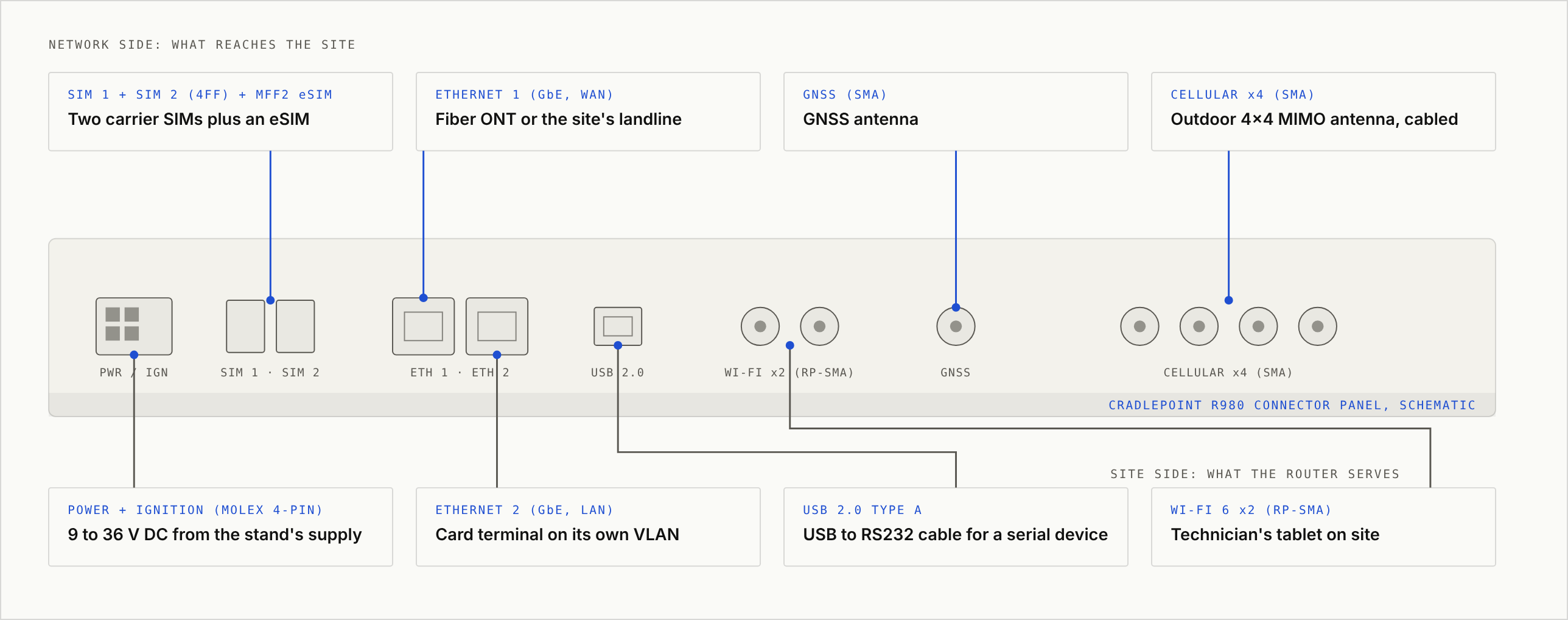
What each connector on the R980 meets at the stand:
| Port | What It Meets at the Site |
|---|---|
| SIM 1 and SIM 2 (4FF) plus MFF2 eSIM | Two carrier SIMs and an embedded eSIM holding up to eight profiles, so the carrier can change from NetCloud. |
| Ethernet 1 (GbE, set as WAN) | The fiber ONT or the site's landline as primary; both Ethernet ports switch between LAN and WAN. |
| GNSS (SMA) | A cabled GNSS antenna that places the site on the NetCloud map. |
| Cellular (four SMA) | An outdoor 4x4 MIMO antenna, cabled in; the datasheet rules out direct-attach antennas on every connector. |
| Power and ignition (Molex Micro-Fit 4-pin) | 9 to 36 V DC off the stand's supply with an in-line fuse, on the same battery backup as the terminal. In a vehicle the ignition line powers the router up and down with the engine. |
| Ethernet 2 (GbE, set as LAN) | The card terminal on its own VLAN; a controller or camera joins through a small switch on the same port, on a separate VLAN. |
| USB 2.0 Type A | The USB to RS232 cable for a serial device at the stand, or nothing. |
| Wi-Fi 6 (two RP-SMA) | The field technician's tablet on a separate SSID and VLAN; cabled antennas only. |
VLAN Separation for the Card Terminal
The E-series and R-series carry VLAN separation for point-of-sale traffic, which keeps the card terminal apart from cameras, signage, and guest Wi-Fi. The router segments; the acquirer decides what the segmentation does to PCI scope. Remote reboot runs from NetCloud Manager, per device or per group, and out-of-band management reaches a router through an adapter's console port when the LAN is down.
Sites That Already Have a Router: W-Series Adapters
A W-series adapter is powered over Ethernet, managed in NetCloud, and hands a 5G connection to whatever router or firewall sits behind it.
| Adapter | Modem | Rating | Power | Fit |
|---|---|---|---|---|
| W1855 | 5G Release 16 plus Cat 19, dual SIM; FirstNet Trusted, Frontline Verified. | -30 to 70°C; IP67. | 802.3at PoE, injector included. | The outdoor charger, lot, or yard with a controller that already routes. |
| W1850 | 5G plus Cat 20; FirstNet Trusted. | 0 to 50°C. | 802.3at PoE. | The branch that keeps its firewall and adds cellular. |
| W2255 | 5G Release 17 plus Cat 20, two eSIMs. | -30 to 70°C; IP67. | 802.3af PoE. | Indoor or outdoor where the carrier may change remotely. |
W1855 Outdoors, W1850 and W2255 Indoors
The W1855 is the pick for a charger or a kiosk whose controller already handles routing: mount it outside, run one Ethernet cable, and the site has a 5G path on the FirstNet list. The W1850 does the same job indoors for a branch that keeps its firewall. The trap: an adapter is not a router, so a site with no router behind it needs an E-series or R-series instead.
Captive Mode Behind an E-Series Router
The same adapters work as the second modem of an E3000 or E400 in captive mode, managed by the router as if the modem were internal. One part number covers both the add-a-path site and the dual-modem branch. The R-series uses its own captive modems: the R2105 and R2155 on the R980, the RC1250 on the R2400.
Fleet Vehicles and the Command Truck
In a vehicle the router runs on 9 to 36 V, senses ignition, and shuts down on a delay after the engine stops so uploads finish and the battery survives the night. Three R-series models do all three: one for the patrol car and the service truck, one for fleets on a carrier priority program, one for the command truck.
| Model | Modems | DC and Ignition | Ratings | Public Safety Tags | Fit |
|---|---|---|---|---|---|
| R1900 | One 5G plus Cat 20, dual SIM; second via RX30-MC. | 9 to 36 V, ignition sensing with delayed off, GPIO. | -30 to 75°C; IP64; MIL-STD-810G; SAE J1455. | FirstNet Trusted, Frontline Verified. | The patrol car or utility truck. |
| R980 | One 5G plus Cat 19, dual SIM, eSIM; second via R2105 or R2155 captive modem. | 9 to 36 V, ignition sensing. | -30 to 70°C; IP64; MIL-STD-810H; E-Mark. | FirstNet Trusted, T-Priority, Frontline Verified, Frontline Network Slice. | The fleet on T-Priority or Frontline. |
| R2400 | One 5G SA plus Cat 20, Dual-SIM Dual Standby, eSIM; up to five links plus LEO via RC1250 captive modems. | 9 to 36 V, ignition sensing. | -40 to 70°C; IP64. | T-Priority; FirstNet Trusted and Frontline Verified in certification. | The command vehicle. |
R1900 for the Patrol Car and the Utility Truck
The R1900 is the fleet default, with GNSS dead reckoning so the vehicle stays on the map inside a parking structure, the RX30-MC for a second carrier, and the RX30-POE to power cameras from the router. The trap: the second modem is a module ordered with the router, not a SIM added later.
R980 When the Fleet Runs on T-Priority or Frontline
A fleet on T-Priority or Frontline Network Slice picks the R980 before the spec sheet is opened, since it is the only model carrying both. Its eSIM holds eight profiles, so a carrier change happens from the console.
R2400 for the Command Vehicle
The R2400 runs up to five cellular links plus LEO satellite through RC1250 captive modems, with Wi-Fi 7, RTK positioning, and Dual-SIM Dual Standby for a quick carrier switch on the embedded modem, for a command vehicle that carries a crew's laptops, radios, and cameras. It carries T-Priority today; FirstNet Trusted and Frontline Verified are in certification, which holds it out of a FirstNet patrol-car role until they clear.
Across a fleet, NetCloud carries GPS to dispatch every few seconds and holds each vehicle on the map with route history.
Counter Locations: E300, E400, E3000
A permit office, a utility payment window, a depot front desk: a wired line, a counter terminal, staff Wi-Fi, and cellular behind the wired line. The E-series model depends on two things: a second modem, and whether this location also terminates tunnels for others.
| Model | Modems | WAN and LAN | Wi-Fi | NetCloud Package | Fit |
|---|---|---|---|---|---|
| E300 | One 5G or Cat 18, dual SIM; second via MC400. | Five GbE plus one SFP+. | Wi-Fi 6. | Enterprise Branch. | The counter location on a wired line with cellular behind it. |
| E400 | One 5G Release 17, dual SIM plus eSIM; second via captive adapter. | Five 2.5GbE. | Wi-Fi 7. | Enterprise Branch. | The branch that needs 2.5GbE or Wi-Fi 7, or the pop-up site on the optional battery. |
| E3000 | One 5G or Cat 18, dual SIM; second via MC400. | Nine GbE, one 2.5GbE, one 10G SFP+; four 802.3bt PoE-out ports, up to 90 W each within a 140 W budget. | Wi-Fi 6, 4x4. | Enterprise Branch. | The branch that is also the hub, up to 20 tunnels. |
E300 and E400 at the Counter
The E300 is the branch default, with the MC400 slot for a second carrier and FirstNet Trusted on the 5G and Cat 18 versions; the Cat 7 versions reached end of sale in September 2026. The E400 is the newer unit, with 2.5GbE, Wi-Fi 7, and an optional eight-hour battery for a pop-up site, and no FirstNet designation.
E3000 When the Branch Is Also the Hub
An operator with 20 locations or fewer needs nothing else at headquarters; the E3000 is the campus router and the tunnel endpoint in one chassis, with four PoE-out ports, up to 90 W each inside a 140 W budget, for access points and cameras. Past 20 tunnels, or wherever bonding is required, the endpoint is a NetCloud Service Gateway.
| Endpoint | What It Is | Tunnels | When It Fits |
|---|---|---|---|
| E3000 | The branch router with hub duty. | 20 IPsec, 400 Mbps. | Up to 20 sites where the hub also routes the campus. |
| NetCloud Service Gateway | Hardware or virtual appliance; the endpoint for Intelligent Bonding. | Up to 4,000, 250 Mbps to 4 Gbps. | Beyond 20 tunnels, or any site that needs bonding. |
Every Deployment, One Row Each
| Deployment | Model | Alternate | NetCloud Package | FirstNet Trusted | Hub Needed |
|---|---|---|---|---|---|
| Fixed indoor cabinet | S700 | S400 | IoT | S700 yes, S400 no. | Only for bonding. |
| Fixed outdoor stand | R980 | R2100 | Mobile (R980) or Mobile Performance (R2100) | Yes. | No; bonding is on the R1900 and R2400. |
| Site with an existing router | W1855 | W2255 | Branch Adapter | W1855 yes, W2255 no. | No. |
| Patrol car or utility truck | R1900 | R980 | Mobile Performance | Yes. | Yes, for bonding. |
| Fleet on T-Priority or Frontline | R980 | R1900 | Mobile (R980) or Mobile Performance (R1900) | Yes. | Only with the R1900; the R980 does not bond. |
| Command vehicle | R2400 | R1900 with RX30-MC | Mobile | R2400 in certification, R1900 yes. | Yes. |
| Staffed branch | E300 | E400 | Enterprise Branch | E300 yes, E400 no. | Only for bonding. |
| Branch that is also the hub | E3000 | E300 plus Service Gateway | Enterprise Branch | Yes. | Is the hub to 20 tunnels. |
| Hub | NetCloud Service Gateway | E3000 | NetCloud Exchange | Not applicable. | Is the hub. |
Common Questions
Does a Cradlepoint Router Work Without a NetCloud Subscription?
It keeps routing on its last configuration. For 30 days after expiry it is Non-Compliant, still managed in NetCloud Manager, with Advanced features and security add-ons off. After that it is Unlicensed: out of NetCloud Manager, no out-of-band management or Remote Connect, no configuration changes, no firmware updates, no VPN hub or spoke role. A terminal behind it keeps authorizing until something at the site changes.
Which Cradlepoint Routers Are FirstNet Trusted?
R1900, R980, R920 (C7A), R2100, E300, E3000, S700 (C4D), W1850, and W1855. The R2400 is in certification. E400, S400, and W2255 carry no FirstNet designation on their datasheets.
Which Cradlepoint Router Goes in a Police Car?
The R1900 for a fleet on FirstNet or Verizon Frontline, with the RX30-MC when a second carrier is needed. The R980 for a fleet on T-Priority or Frontline Network Slice. Both take 9 to 36 V with ignition sensing and carry GNSS for dispatch tracking.
Map the Fleet and the Sites Before Ordering
Send the vehicle list and the site list. Paygasus marks each one with the NetCloud package family, the FirstNet Trusted check, the model, and the second-modem path, and notes where the card terminal needs its own VLAN and where power comes from. As an authorized Cradlepoint reseller, Paygasus supplies the router and the package together, installs at the site or in the vehicle, and carries the deployment alongside the payments.
Start the conversationNext in this series → Peplink Router Use Cases: Which Model Fits Each Site Type
Writing on the infrastructure of the physical economy — the payments and connectivity underneath it all.
Peplink Router Use Cases: Which Model Fits Each Site Type
Balance or MAX, one modem or two, a hub or not. How the lineup sorts by the site it goes to, with the payment terminal in the picture, and which care plan each model needs.

Cellular Failover for Payment Terminals: How to Keep Unattended Sites Online
Bars showing and no data moving is the outage that takes a charger or a kiosk down. What a backup line has to do at a site nobody staffs, and why a second SIM is not a second carrier.

Keep First Responders and Utility Crews Connected Through Storm Season
A PACE plan is only as good as what sits in each tier. How agencies, utilities, and the crews who repair the network itself stage bonded satellite connectivity before the storms arrive.